
We have made changes in Amazon Voucher code share process to improve customer experience and repeat contacts.
Step 1: How the Customer Gets the Amazon Voucher Code Automatically
After the customer buys an eligible plan, the Amazon voucher code is automatically sent by the backend system via:
Email
SMS
These messages will include:
The voucher code
Instructions on how to redeem the code
Step 2: If Customer Didn't Receive the Code
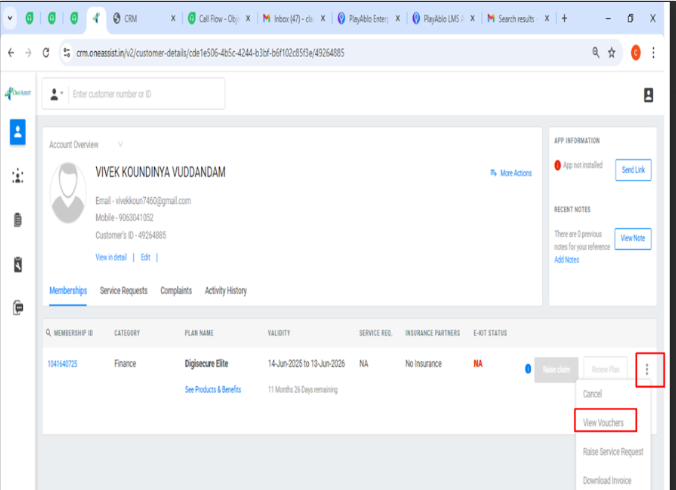
If a customer says they haven’t received the code, here’s what the agent must do:
Open the customer’s details in the CRM.
Go to the Plan Benefits section.
Click on the three dots (⋮) beside the plan.
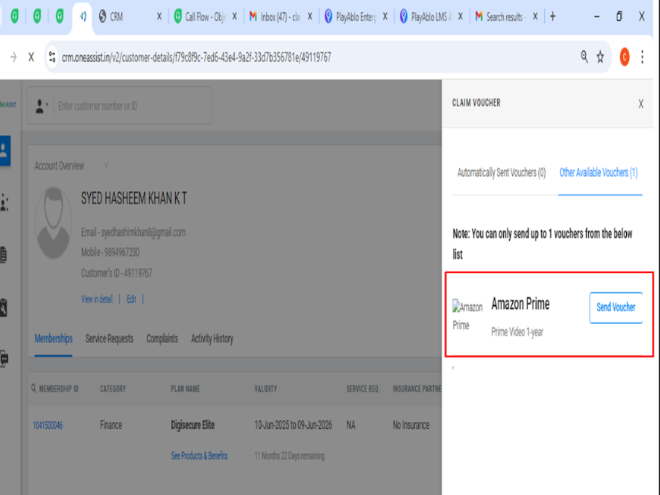
Select “View Voucher Code.”
Click on "Send Voucher".
Steps to Redeem Your Amazon Prime Video Gift Card (App)
- Sign in to your Amazon account using the Amazon mobile app.
- Go to your Profile section from the bottom navigation menu.
- Scroll down and tap on “Add gift card to your balance.”
- Enter the gift card code to add the amount to your Prime Voucher Balance.
- Once added, go to Prime Membership, select your preferred Prime Plan.
- Choose your billing address, and during checkout, use the voucher balance as your payment method.
